

Does your towel make you levitate?

Let me talk to you about my favorite towel of my entire life, Peshtemals. But I have to let you know, we’re not going to be talking about how plush it is. It isn’t the thickest towel. It isn’t the softest towel, but it’s still my favorite towel. And it’s for a number of reasons that you wouldn’t know unless you had these towels.

  • fast-drying
  • packable
  • durable
  • stylish
  • more hygienic
  • convenient

But what makes these towels most remarkable is how much they can help you save on your home electric costs!

Peshtemals, also known as Turkish towels, or hammam towels, were created during the Ottoman Empire in modern day Turkey. They are thin cotton towels that are the perfect do-it-all towel for home use, beach use, gym/ spa, etc., and have become popular globally because of their functionality and versatility.

Peshtemals are fast drying, packable and durable. The fabric is made using 100% Turkish cotton, regarded for its long fibers and softness, spun from manually operated looms in Turkey. The cotton is tightly woven, making it strong and highly absorbent without taking up too much space. The tightly spun fibers help repel sand and earth easier than other fabrics making it perfect for beach days or picnics. Their stylish designs make them perfect decorative pieces and furniture covers as well.

When you’re visiting someone’s house, the guest towels are sometimes the thickest, plushest towels, too thick to be useful. You wouldn’t take a thick plush towel to the swimming pool or the beach and put it down in the sand because it would pick up a lot of sand and grime in those thick plush fibers.
You’re already aware of a variety of towels and that certain towels serve certain purposes. Towels can be made of a variety of fabrics including cotton, cotton polyester blends, linen, bamboo, and synthetic microfibers. Cotton is common because it is soft and absorbent, linen is known for its durability, bamboo is prized for its sustainable softness, and microfibers are known to be quick drying.

Peshtemals are more hygienic

Doctors recommend that when drying ourselves off we pat ourselves dry rather than rub. With a plush towel, you can rub the thick sock fibers over your skin with some force to it. But you might not do that with a thinner towel because it might scratch your skin. If you’re not wanting to be abrasive, you would pat.

Doctors also recommend that we should be washing our towels after each use because dead skin and bacteria collect on the towel and grow when it’s hanging on the towel rack. We may be reusing the plush towel for days in a row and then try to dry it out between the days and that doesn’t work because it introduces new bacteria colonies to the skin. So instead of going that way and reusing thick towels, use these thin towels and wash them after each use – you can fit 2 to 3 times as many peshtemal towels in the washer!

Peshtemals are so convenient

You can take it anywhere! For example, in your carry on luggage, you can pack for about three or four days of clothes and towel for each day. You wouldn’t be able to fit four traditional bath towels and have any room left for your clothes. But you can take a peshtemal towel with you because it’s very lightweight. In fact, when I travel, I might take a whole week’s worth of peshtemals in my bag because I’m a swimmer. So I might swim two or three times on that three or four day trip. I might take four towels and clothes for three to four days, all in one carry-on bag. And you just can’t do that with any other towel.
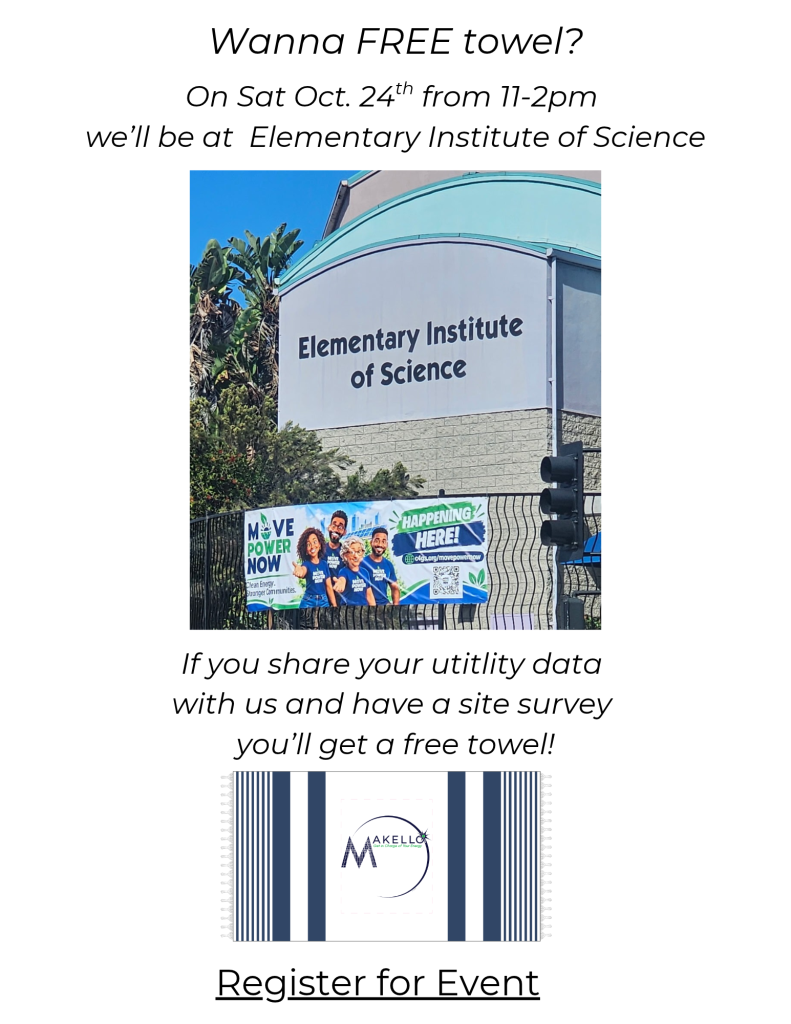
Wanna FREE Makello towel?  Come to Elementary Institute of Science Oct 24, 2026 @ 11am-2pm, and Book an Appointment for Energy Analysis, and securely share your utility data.

Utility Cost Savings

Understanding your energy profile is critically important for being able to take control of your energy independence, so that you don’t have to buy too much solar or too much battery to get to your goal, and your energy profile is affected by usage such as washing your towels.

I’m sure we’ve all experienced over loading the washer with thick, plush towels to the point the spin cycle stops working and the towels are left just sitting in still water. We’re forced to run another wash cycle and sometimes the final spin cycle doesn’t ring out enough water and then we have to leave them in the dryer longer, increasing energy costs even more!

Plush towels increase the electric bill more, especially at times of the year when the solar power isn’t producing as much. If you’re running all this extra power to dry your laundry when it didn’t need to be that wet anyways, there’s an incredible amount of savings in changing your towels.

Instead of three plush towels, you can now wash up to 15 peshtemal towels in one load and the washer will not be overloaded. And when it spins dry, it’ll be much drier. And then the heat pump clothes dryer doesn’t have to go through as long a cycle.

Wanna FREE Makello towel? Come to Elementary Institute of Science, 608 51st Street, San Diego, CA 92114, on Oct 24, 2026 @ 11am-2pm.

Register for Climate Action Week @ EIS here.

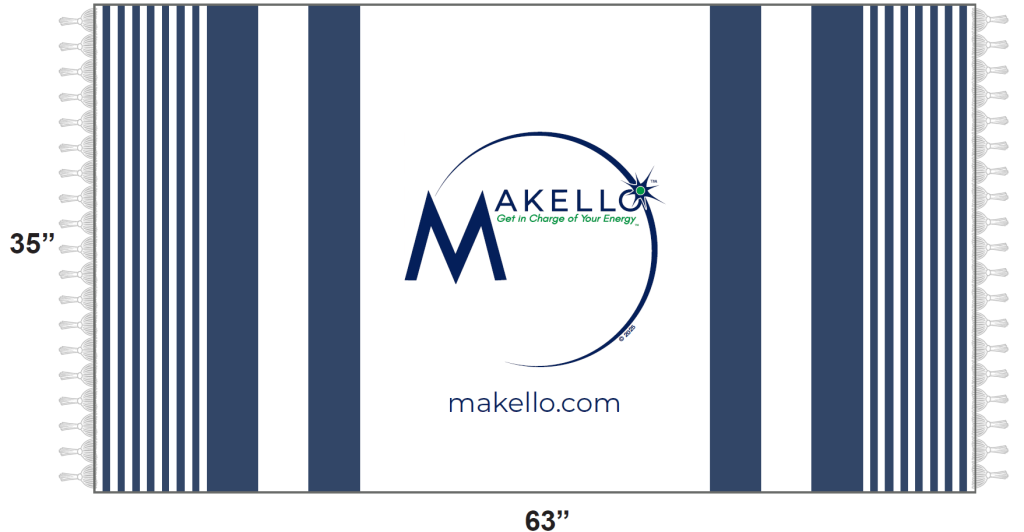
When you Book an Appointment for Energy Analysis, and securely share your utility data, you’ll get a FREE Peshtemal Beach Towel: Full length, lightweight, compact, sand resistant weave, and water & energy efficient. Up to 15 towels per large washer!

How Do You Download Your 15 Minute Interval Data?


You are working a solar company and they have a lot of questions to determine the optimal system size that best matches your energy goals. Now you’ve been asked to download your SDGE Energy Usage data. There’s Green Button Data, Utility API Authorization, Two-Factor Verification or any other number of options. What do you need to do and how do you do it?

At Makello, we request either downloading Green Button data in 15 minute intervals from your SDGE account or to authorize Utility API collection of data on your behalf and this article will focus on those methods.

SDGE My Energy Center Login

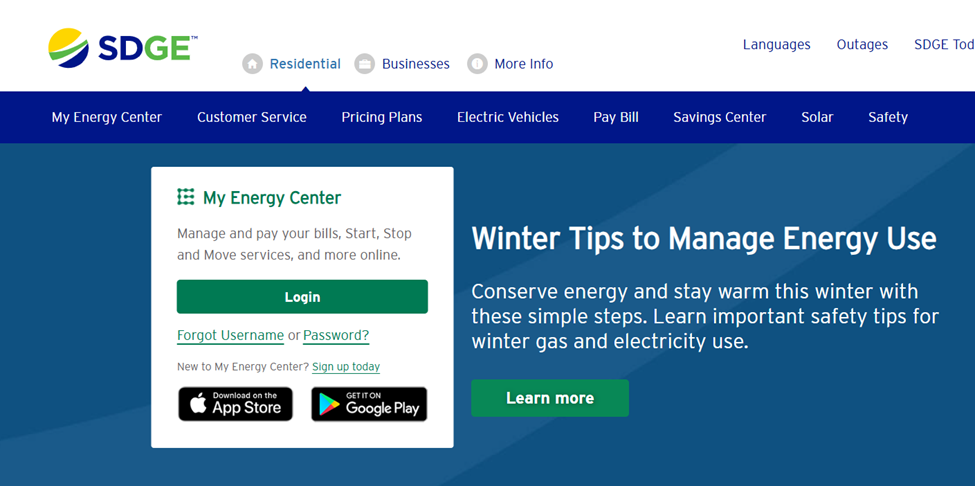
The first step to downloading your interval data from SDGE My Energy Center is to navigate to https://www.sdge.com/

Click on Login in the home page if you have already set up an online account to view your SDGE bills. First Time Users of SDGE My Energy Center should click on Set Up Today and follow the steps to register. You may have to login after registration. If you have two factor authentication activated, you will be asked to enter in a code that is sent to the email or phone number you have on file.

Green Button Data Download

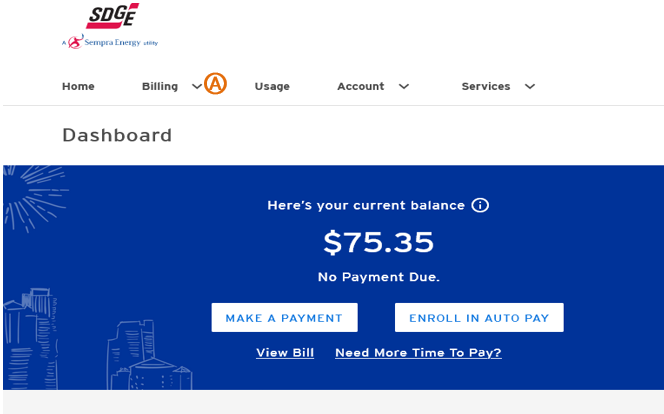
After successful log in, you will see your dashboard. The dashboard design may vary due to your enrollment in a Community Choice Aggregator or not.

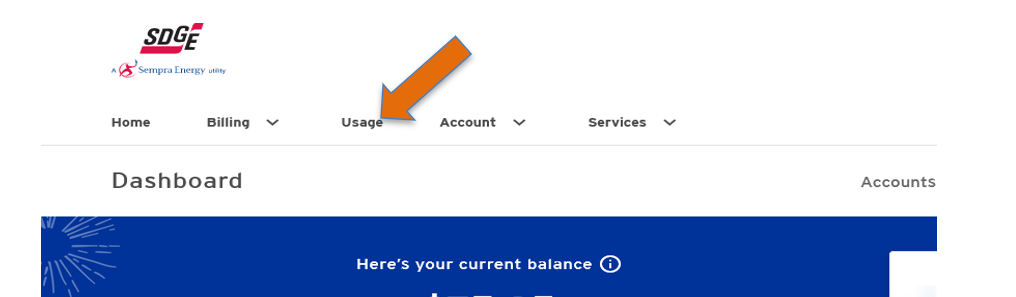
Click on the Usage tab at the top of the dashboard.

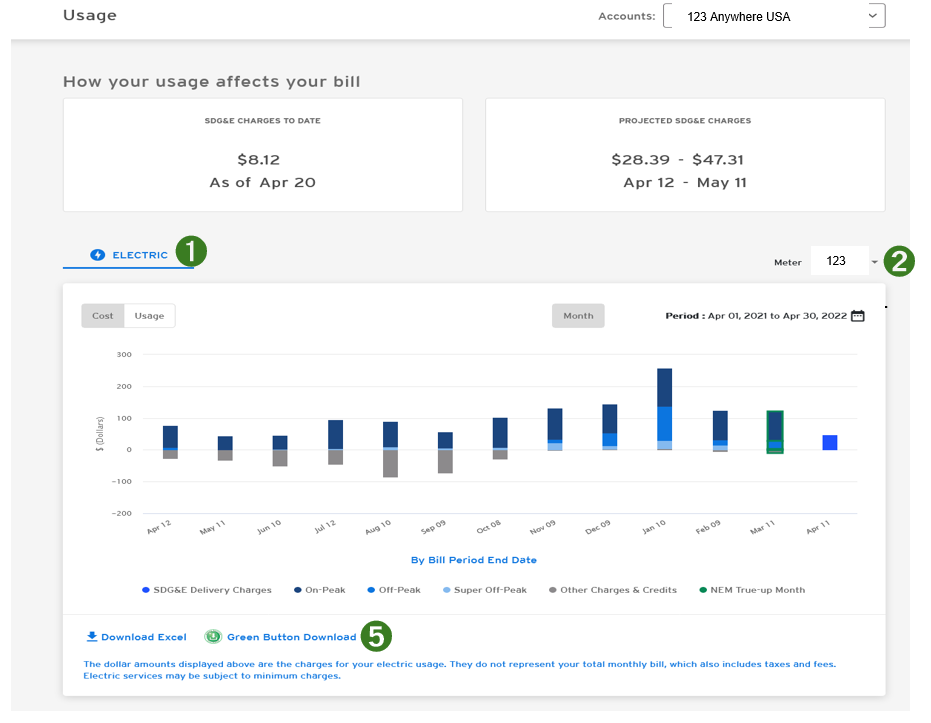
You can download your data from your Usage page.
1. Select Usage from the drop down menu in the Usage Tab.
2. Select your electric Meter from the drop down menu on the right side of the page.
3. Scroll down to the bottom of the page.
4. In the bottom left corner, you will see button for Download Excel and Green Button Download.
5. Click on Green Button Download to download data.  

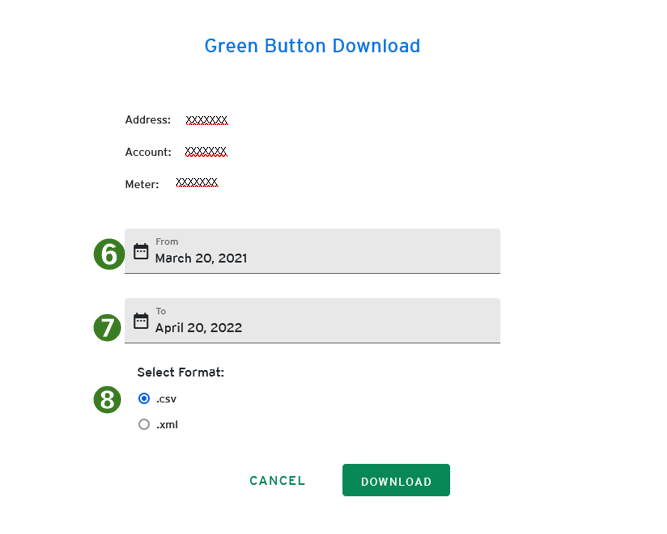
6. Set the date in the drop-down tab to download as many months of data as possible. Twelve (12) full months of data is preferred but one month of usage data is needed if  available.  
7. Under the Select Format heading, click .csv button (this step applies to electric meters only), then click download.
8. Under the Select Format heading, click .xml button, then click download (this step applies to both gas and electric meters for customers with both types of meters).
9. Repeat steps 1-8 for each meter that services the property, gas and electric.


Turning SDGE Two Step Verification Off or On

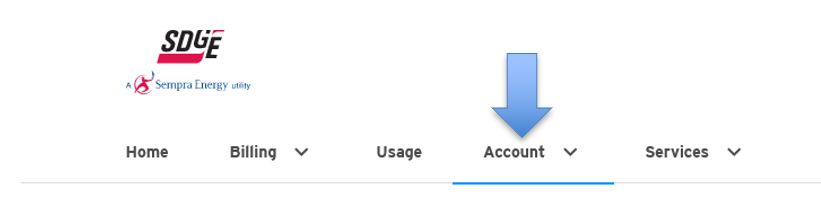
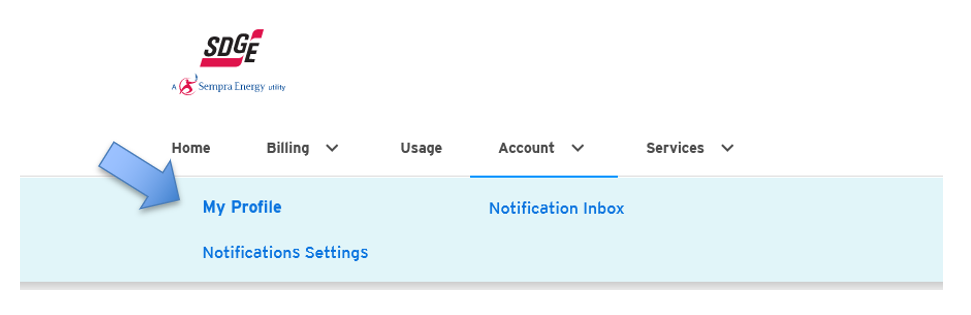
Turn 2 Step Verification off or on by clicking on Account in menu bar.

Then select My Profile from the drop down menu.

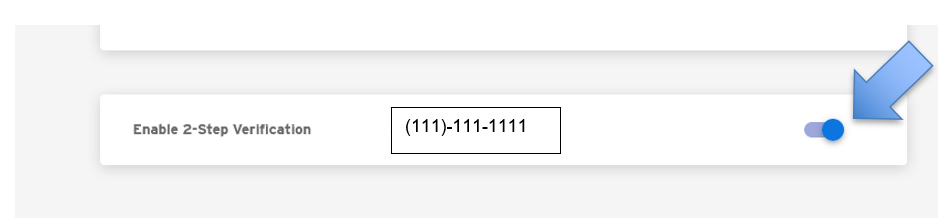
Scroll to the Enable 2-Step Verification section and click on the blue button on the right side of the screen to turn off the 2 Step Verification.

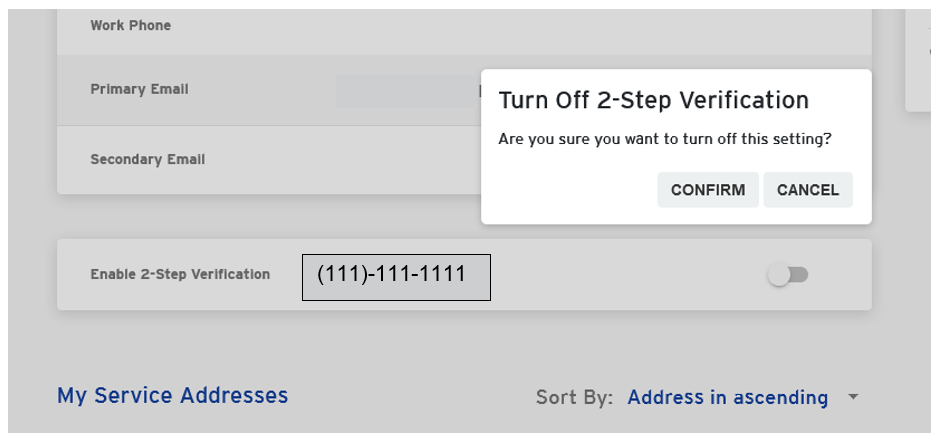
Click on Confirm in the pop up menu.

You have turned off the 2 Step Verification. Please note: 2 Step Verification must be completed prior to authorizing Utility API data collection.

To Turn 2 Step Verification back on, simply return to your Account, select My Profile, scroll down to Enable 2-Step Verification and click on the grey button on the right side of the screen, click on Confirm.  

Authorization of Utility API Data Request via Link


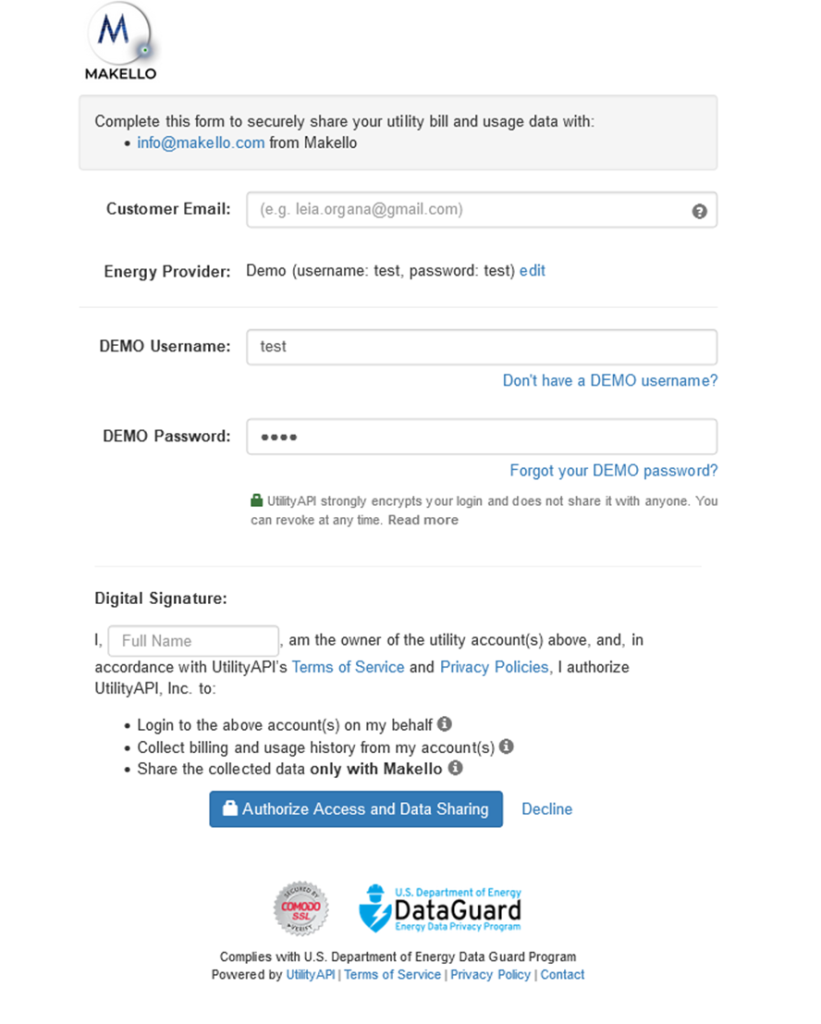
Please click on the Utility API Authorization link provided by Makello in the email you received.

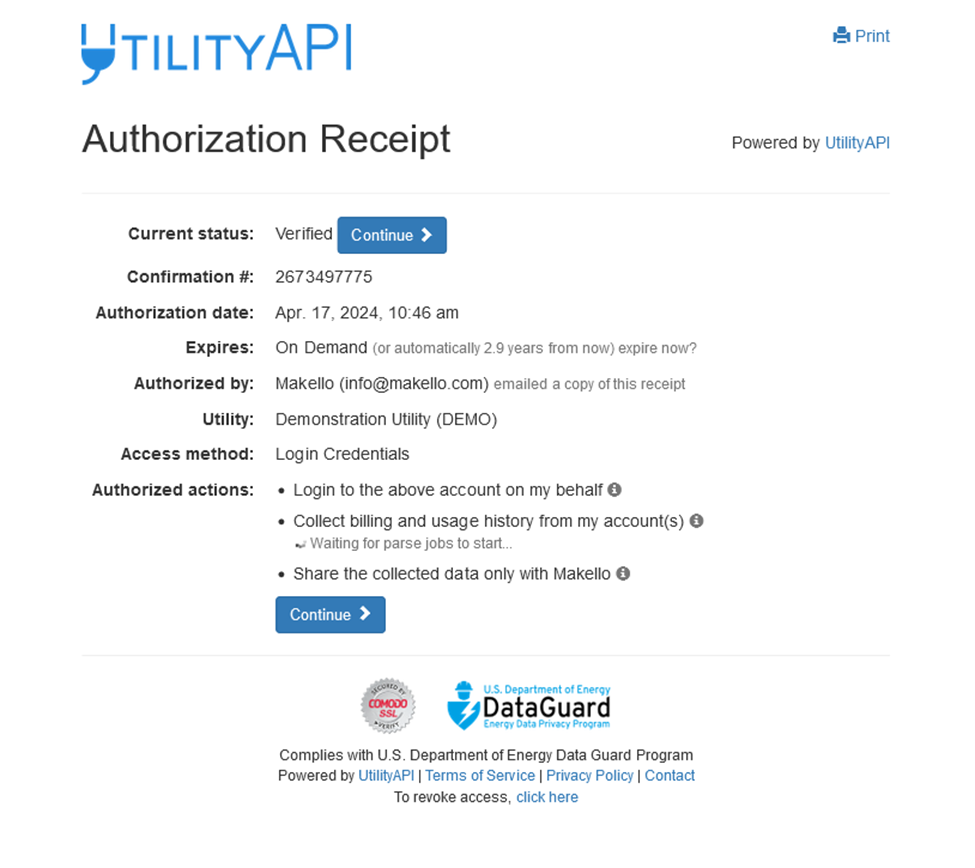
You should be brought to a screen similar to the picture below. Please provide the requested information and click Authorize Access and Data Sharing.

You should receive an authorization receipt similar to the picture below after authorization has been completed.

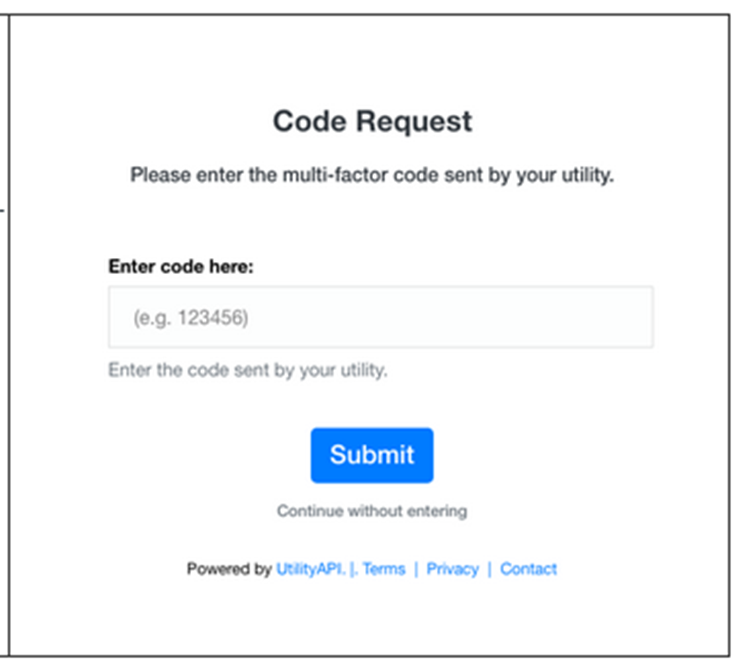
If your SDGE account has  two-step verification, you should then receive a two-step verification code from SDGE sent via text message.  Please enter the code in the space provided.  An example of  the screen  where you enter the two-step verification code provided in the image below.

Alternatively, you may manually deactivate and reactivate the multi-step verification for your SDGE by following the steps previously outlined.

Please note: 2 Step Verification must be completed prior to authorizing Utility API data collection.

Utility API Data Collection Refresh Historical Data

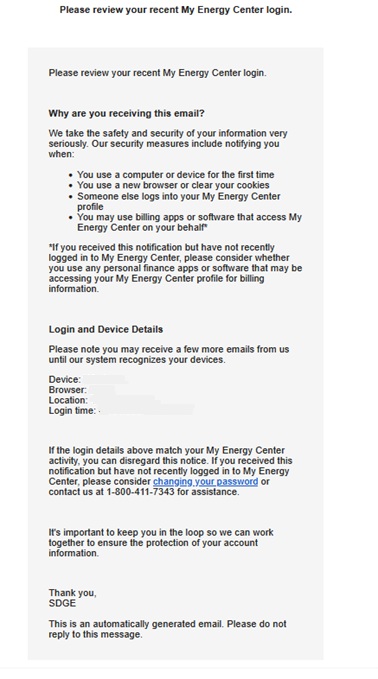
When Utility API Refreshes Data via a new collection, you may receive a message informing you of the activity on your account.

You may find out more about Utility API https://utilityapi.com/

SDGE Utility Bill Download Instructions

Next document needed is a .pdf copy of your bills

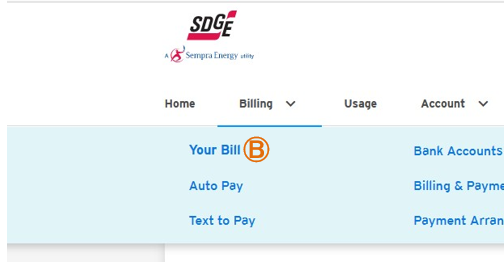
A. Click on Billing drop down menu at the top right of your dashboard.

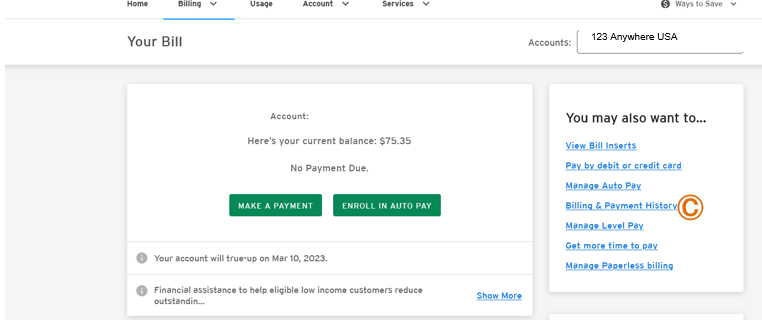
B. Click on Your Bill from the Billing drop down menu.

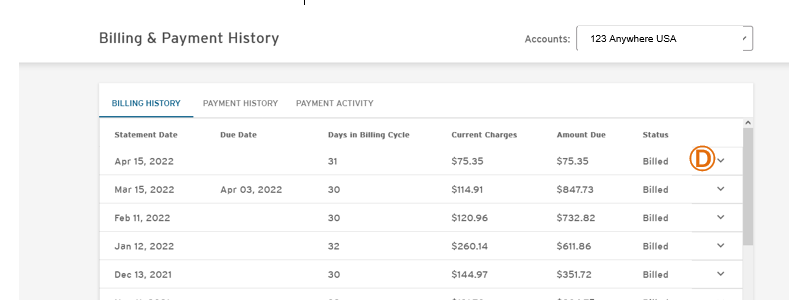
C. Click on the link for Billing & Payment History from the menu on the right side  of the menu.

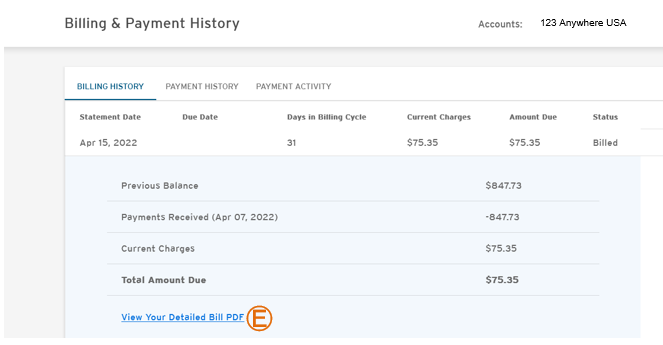
D. Click on the drop down menu arrow on the right side of the screen to display your bill.

E. Click on the View Your Bill PDF link.

F. Click on the folder icon on your computer’s menu bar to download the file. Save the .pdf file to the folder of your choice.

G. Return to the Billing & Payment History Screen and repeat the download process detailed in steps D-F for as many of the most recent months of Bills available, up to twelve (12) months of Bills.

    Green Energy EPC by Makello CA Lic # 1110498